
The SLP Caseload Number Nobody Writes Down: Minutes Owed, Make-Up Windows, and Re-Eval Dates
A caseload is not a headcount. It is a stack of promises, each one measured in minutes, that somebody has to keep adding up.
Thirty minutes, twice a week, for a full service year, is a number. Subtract the day the building closed, the week you were pulled to cover testing, the session a student was absent. Now it's a different number — and unless someone tracks both sides of that subtraction on purpose, nobody actually knows what it is by October, let alone by June.
That's the part of SLP caseload work that has nothing to do with therapy technique and everything to do with arithmetic that never stops moving: required minutes accruing every week, delivered minutes coming off a session log, and the gap between them sitting there whether anyone is looking at it or not. September and October — when schedules get built and annual IEP reviews start landing on the calendar — is exactly when that gap is easiest to lose track of.
Here's what a caseload tracker that treats minutes as a running ledger, instead of a session log you scroll back through, looks like in practice — every number below pulled from a real, verified build.
The number underneath the caseload
Picture a caseload dashboard built from example data — 14 students, 764 logged sessions — showing one figure at the top: total minutes owed, 4,020, with = 67 hours underneath in smaller type. That single number is the whole point of tracking minutes at the caseload level instead of the session level. A session log tells you what happened. A ledger tells you what's still outstanding.
Around that headline figure sit four smaller ones, from the same example dataset:
| Metric | Example value |
|---|---|
| Students owed any minutes | 13 |
| Make-up windows still open | 5 |
| Windows that closed with no make-up | 33 |
| Share of required minutes delivered | 82.7% |
That third number is the uncomfortable one. Five windows still open means five things you can still act on. Thirty-three that already closed means thirty-three sessions that were owed and, in this example dataset, never got made up — a number that only shows up if something is watching the calendar every week, not just logging what happened after the fact.
Individual students tell the same story at a smaller scale. Three example rows from the ledger:
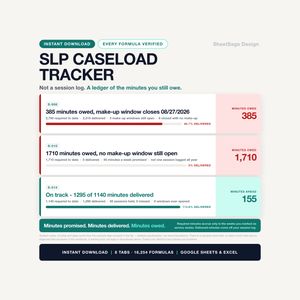
- S-006 — 385 minutes owed, make-up window closes 08/27/2026 (flagged red — closing soon)
- S-010 — 1,710 minutes owed, no make-up window still open (flagged red — nothing left to schedule against)
- S-014 — on track, 1,295 of 1,140 minutes delivered (flagged green)
S-006 and S-014 are both fine, in the sense that both still have a path forward. S-010 is the row that matters, because "no make-up window still open" is a different kind of problem than "window closing in three days" — it means the arithmetic caught up with a case where the scheduling didn't.
Why the make-up window is a countdown, not a note
Most minutes lost on a caseload aren't lost to bad planning. They're lost to a normal, unavoidable interruption — the provider is out, the building closes for weather, a student is absent — that opens a small window to reschedule the session, which then closes on its own schedule while attention is elsewhere.
In a session log built to track this, logging a session as provider-absent or school-closed opens a make-up window automatically, sized to whatever number of days a given district allows — typed into settings, not assumed. From there the countdown does the rest. Example rows from a real session log show the range, day to day:
| Date | Student | Reason | Alert |
|---|---|---|---|
| 07/28/2026 | S-006 | Provider absent | Make up within 1 days |
| 08/06/2026 | S-006 | School closed | Make up within 10 days |
| 08/13/2026 | S-007 | School closed | Make-up window open - 17 days |
And, separately, a row from further back: MAKE-UP WINDOW CLOSED 14 days ago — flagged red, the same as a window about to close, because a closed window and a closing window both need a look, just for different reasons.
The mechanism works because it's built on dates a provider actually enters — service minutes per week, which weeks of the year count as service weeks, and the make-up window length itself, all sitting in a settings tab rather than hard-coded anywhere. Required minutes accrue only in the weeks marked as service weeks, and delivered minutes come straight off the session log — so the "owed" figure for any student is always the honest difference between two numbers, not a guess at the end of a grading period.
Three deadlines, one queue, sorted by what's closest
A caseload doesn't carry just one kind of due date. Re-evaluation, annual IEP review, and initial evaluation are three separate countdowns, and they don't line up with each other or with the make-up-minutes clock.
A due-dates queue sorted by days remaining — rather than by student name or alphabetical order — turns that into something scannable. Ten example rows from a real build, sorted exactly this way (10 of 14 example students fell inside a 30-day warning window):
| Student | Days | What's due |
|---|---|---|
| S-009 | −105 | Re-evaluation: PAST DUE by 105 days |
| S-002 | −20 | Re-evaluation: PAST DUE by 20 days |
| S-012 | −1 | Initial evaluation: PAST DUE by 1 days |
| S-010 | 0 | Re-evaluation: DUE TODAY |
| S-013 | 1 | Re-evaluation: Due in 1 days - schedule now |
| S-008 | 2 | Initial evaluation: Due in 2 days - schedule now |
| S-006 | 5 | Re-evaluation: Due in 5 days - schedule now |
| S-005 | 10 | Initial evaluation: Due in 10 days - schedule now |
| S-001 | 12 | Annual IEP review: Due in 12 days - schedule now |
| S-003 | 25 | Annual IEP review: Due in 25 days - schedule now |
Two things stand out. First, "past due" and "due today" sort ahead of everything else — the rows that need a phone call this morning sit at the top, not buried between rows with three weeks of runway. Second, every date traces back to a date a provider typed in, not one the workbook decided on its own. For S-010, the chain is: an evaluation on 09/11/2023, a 36-month interval that would suggest 09/11/2026 — and the due date actually typed in, 08/26/2026, which is the one that governs the countdown and puts that row at "DUE TODAY." The suggestion is a starting point; the number that runs the countdown is whatever the provider enters, because re-evaluation cycles and review timelines differ by state and by district. This is a tracking tool; follow your district's policies and timelines.
Workload, not headcount
Forty-five minutes of a group session is not forty-five minutes off a provider's week the way forty-five individual minutes is. A caseload built around a simple count of minutes-per-student misses that difference entirely.
One example makes it concrete: a weighted workload of 832.75 minutes per week against 1,500 available — inside the time available, but only visible once individual, group, and consultation minutes are weighted differently rather than added up as interchangeable. That figure is closer to what a provider's week actually feels like than a raw minutes-per-student sum, because it's rolled up from 60 example student rows, each carrying a delivery model and its own required minutes, through weights the provider sets — not weights the workbook assumes.
What a weekly caseload check actually looks like
Fifteen minutes, once a week, in roughly this order:
- Anything with a make-up window closing inside the next few days — sorted by days left, not by which student's file happens to be open.
- Any window that already closed unmade — not to relitigate it, but to know the real number, the way the dashboard's 33-closed-unmade figure does.
- The due-dates queue, top to bottom — past due and due-today rows first, as in the sorted table above.
- Students falling behind on delivered vs. required minutes, the way S-010's row does, before the gap gets large enough that closing it means finding sessions that don't fit.
- The weighted workload number, once a month or after any caseload change, against the minutes actually available.
None of that needs more than a service line entered once per student, a session logged after it happens, and a handful of dates typed into a settings tab the provider controls.
Where this lives
That's the entire mechanism behind our School SLP Caseload & Service-Minute Tracker — one workbook, 8 tabs (START, SETTINGS, CASELOAD, IEP SERVICES, SESSION LOG, SERVICE-MINUTE LEDGER, DEADLINES, DASHBOARD), built around 60 example student rows, 150 example service lines, 800 example session rows, and a 52-week calendar you set once. No student-name field, no date-of-birth field, no diagnosis field anywhere in the file — students are identified with a code you choose (S-001, S-002…), and where you keep the code-to-name key is your own call, made inside whatever system your district already uses for student records.
Works in Google Sheets and Microsoft Excel, one .xlsx file, instant download, no subscription. Get it on Payhip → — the Etsy listing for this one goes live August 31, so for now Payhip is the only place to get it, with the same file and the same price.
This article describes a spreadsheet-based tracking tool for school-based speech-language providers, built and priced as described above. It is a tracking tool, not legal or educational advice — follow your district's own policies and timelines for evaluation cycles, make-up windows, and every other interval mentioned here, since these differ by state and by district and change over time. Every number in this article is example data shipped inside the workbook, illustrating how the calculations work; none of it is a benchmark, a recommendation, or a claim about any real caseload. No outcome is promised.
 Your caseload is not a headcount. It is a pile of minutes you promised — and nobody is counting them but you.…
See the School SLP Caseload & Service-Minute Tracker →